Ship a brand launch from one chat.
Connect Storyboard to your AI tool. Run a playbook. Get a brand kit, moodboard, hero shots, ad video, and captions — without leaving the chat. No design tool, no engineering.
- Brand kit — palette + voice, reusable next campaign
- Moodboard with a shareable link
- Hero product shots, IG-ready
- Lifestyle scenes with your product placed in
- Short ad video — IG (1:1) + TikTok (9:16)
- Caption pack for IG, TikTok, X
- Executive briefing deck, email-ready
1.Get your Daydream API key
One key. Works across every AI tool you set up below.
- Open app.daydream.live and sign in
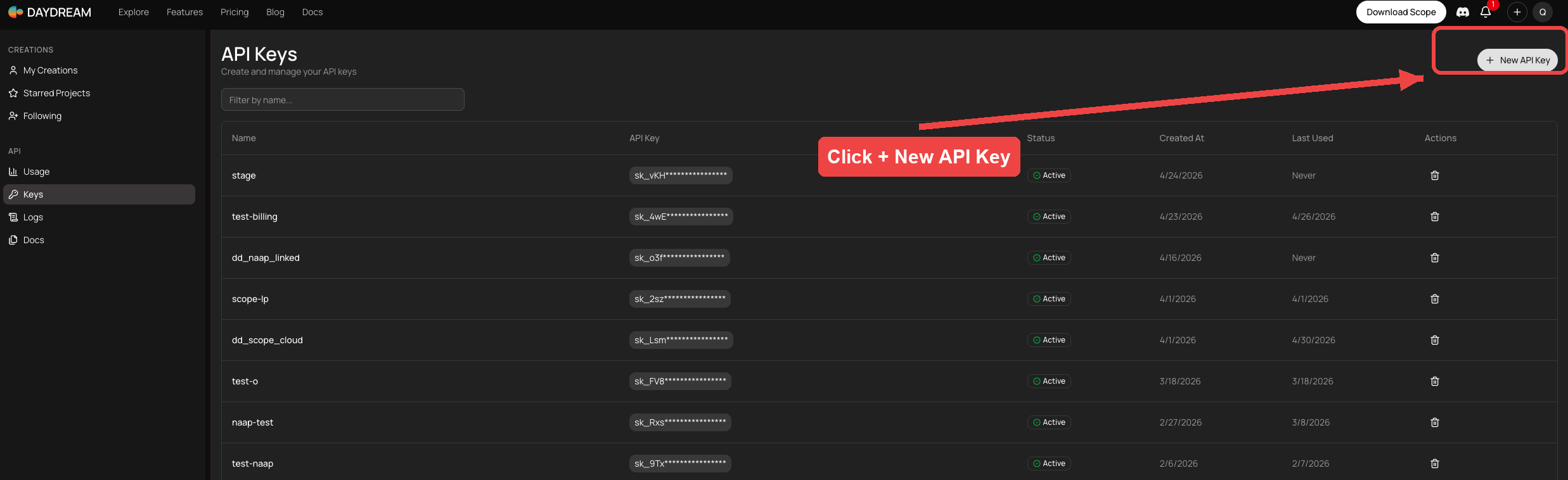
- Go to Keys in the left sidebar
- Click + New API Key in the top-right corner (see below)
- Copy the key (starts with
sk_) and save it somewhere safe
2.Connect Storyboard to your AI tool
Pick the tool you use. Paste the config. Replace the highlighted sk_YOUR_KEY_HERE with your actual key.
One command in your terminal:
claude mcp add storyboard https://storyboard.daydream.monster/api/mcp \
--transport http \
--header "Authorization: Bearer sk_YOUR_KEY_HERE"Confirm — in any Claude Code session:
/mcp # should list storyboard ✓
/tools # lists Storyboard's toolsOpen the config file in any text editor:
- Mac:
~/Library/Application Support/Claude/claude_desktop_config.json - Windows:
%APPDATA%\Claude\claude_desktop_config.json
Paste this block (merge into mcpServers if other servers already live there):
{
"mcpServers": {
"storyboard": {
"command": "npx",
"args": [
"-y",
"mcp-remote",
"https://storyboard.daydream.monster/api/mcp",
"--header",
"Authorization: Bearer sk_YOUR_KEY_HERE"
]
}
}
}Quit Claude Desktop (⌘Q on Mac, system tray → Quit on Windows). Reopen. Look for the 🔌 icon next to the chat input and confirm storyboard is listed.
npx ships with Node. If you don't have it: download from nodejs.org (the LTS installer). One-time, two-minute install.
No command-line. In claude.ai:
- Profile (top right) → Settings
- Integrations → Add custom integration
- Fill in:
# Name
storyboard
# Server URL
https://storyboard.daydream.monster/api/mcp
# Authorization header
Authorization: Bearer sk_YOUR_KEY_HERESave. In any new chat, type /tools to confirm.
Cursor Settings → Tools & MCP → New MCP Server (opens mcp.json). Or edit directly:
- Global:
~/.cursor/mcp.json - Per-project:
.cursor/mcp.jsonin your repo root
{
"mcpServers": {
"storyboard": {
"command": "npx",
"args": [
"-y",
"mcp-remote",
"https://storyboard.daydream.monster/api/mcp",
"--header",
"Authorization: Bearer sk_YOUR_KEY_HERE"
]
}
}
}Reload Cursor (Cmd/Ctrl+Shift+P → Reload Window). Settings → Tools & MCP → confirm storyboard shows a green dot.
OpenAI Codex CLI uses TOML, not JSON. Edit ~/.codex/config.toml (or run codex mcp add for the guided helper):
[mcp_servers.storyboard]
command = "npx"
args = [
"-y",
"mcp-remote",
"https://storyboard.daydream.monster/api/mcp",
"--header",
"Authorization: Bearer sk_YOUR_KEY_HERE",
]Restart your Codex session. Type /mcp to confirm storyboard is connected.
In Antigravity: Manage MCP Servers (top of the MCP store) → View raw config. Paste this into mcp_config.json:
{
"mcpServers": {
"storyboard": {
"command": "npx",
"args": [
"-y",
"mcp-remote",
"https://storyboard.daydream.monster/api/mcp",
"--header",
"Authorization: Bearer sk_YOUR_KEY_HERE"
]
}
}
}Save. Antigravity hot-reloads MCP servers — open a new agent chat and confirm storyboard appears in the tool list.
sk_… key over sk_YOUR_KEY_HERE. Leave everything else as shown.
3.Install the 6 marketer skills
A skill is a small markdown file that teaches your AI how a brand marketer thinks. These six turn a general AI into a marketing director.
Brand-board pro moodboard-marketer.md
Forces the 70/30 on-brand split + composition mix (hero, lifestyle, detail, surface, type) so your moodboard reads as on-brand, not generic.
Triggers: "moodboard for our brand," "stakeholder deck"
Product placer product-campaign.md
Picks the right approach (place-product / train-a-model / cutout-composite) so your product looks identical across every scene.
Triggers: "place product in," "marketing campaign"
Commercial director commercial.md
Trust-building ad copy, not desperation. Tone, pacing, "show don't sell."
Triggers: "ad copy," "social spot"
Finishing producer finishing-quality.md
Stitches, crops, watermarks, exports to the right platform spec. A great render is useless if it's wrong-aspect for TikTok.
Triggers: "ready for IG," "platform export," "final cut"
Subject-transfer specialist subject-transfer.md
One product + N scene descriptions → N consistent images. No rewriting prompts per scene.
Triggers: "put this in different scenes," "subject transfer"
Schedule operator publora-publishing.md
Schedules captions + media to IG, TikTok, X, LinkedIn from chat. No re-uploading anywhere.
Triggers: "schedule the post," "publish to IG"
Install
Step A — download the bundle
Either click to download:
📥 get-started-4-pm.tar.gz — then double-click to unzip on Mac, or right-click → Extract All on Windows.
Or run in your terminal (Mac / Linux / Windows 10+ all support these):
curl -O https://storyboard.daydream.monster/docs/get-started-4-pm/get-started-4-pm.tar.gz
tar xzf get-started-4-pm.tar.gzYou'll end up with a skills/ folder containing six .md files.
Step B — copy skills to your AI tool
Pick your tool. Each tab shows commands for Mac, Linux, and Windows. Run them in the folder where you unzipped skills/.
Mac / Linux (Terminal):
mkdir -p ~/.claude/skills
cp skills/*.md ~/.claude/skills/Windows (PowerShell):
New-Item -ItemType Directory -Force -Path "$env:USERPROFILE\.claude\skills"
Copy-Item skills\*.md "$env:USERPROFILE\.claude\skills\"Open a new Claude Code session, type /skills. All six should appear.
Quickest: drag the unzipped skills/ folder onto the Claude Desktop icon. Skills load for that chat only.
Permanent — Mac:
mkdir -p ~/Documents/Claude/skills
cp skills/*.md ~/Documents/Claude/skills/Permanent — Linux:
mkdir -p ~/Documents/Claude/skills
cp skills/*.md ~/Documents/Claude/skills/Permanent — Windows (PowerShell):
New-Item -ItemType Directory -Force -Path "$env:USERPROFILE\Documents\Claude\skills"
Copy-Item skills\*.md "$env:USERPROFILE\Documents\Claude\skills\"Quit Claude Desktop fully (⌘Q on Mac, system tray → Quit on Windows). Reopen.
No command-line needed. In claude.ai:
- Profile (top right) → Settings → Skills
- Click Upload skills
- Drag the six
.mdfiles from your unzippedskills/folder - Save
Skills load automatically when you use trigger phrases ("moodboard for our launch," "schedule the post," etc.).
These tools read markdown rules from their own folders. Same files, different destination.
Cursor — global ~/.cursor/rules/, or per-project .cursor/rules/:
# Mac / Linux
mkdir -p ~/.cursor/rules
cp skills/*.md ~/.cursor/rules/
# Windows (PowerShell)
New-Item -ItemType Directory -Force -Path "$env:USERPROFILE\.cursor\rules"
Copy-Item skills\*.md "$env:USERPROFILE\.cursor\rules\"Codex — concatenate into ~/.codex/AGENTS.md:
# Mac / Linux
mkdir -p ~/.codex
cat skills/*.md >> ~/.codex/AGENTS.md
# Windows (PowerShell)
New-Item -ItemType Directory -Force -Path "$env:USERPROFILE\.codex"
Get-Content skills\*.md | Add-Content "$env:USERPROFILE\.codex\AGENTS.md"Antigravity — drop into the workspace's .antigravity/rules/ folder (or its global rules dir). Antigravity hot-reloads markdown rules on save.
Quick first try — one prompt, no playbook
Paste this into your AI tool. Edit the four highlighted lines to match what you're launching. Send.
# Paste into your AI tool — edit the four highlighted lines
Use Storyboard to make a 6-image moodboard for a product launch.
Brand: Aurora Run
Product: a new pair of trail running shoes called "Aurora Trail 01"
Audience: weekend trail runners, 28–45, who value performance over fashion logos
Aesthetic: cinematic outdoor, early-morning golden hour, real rock and dust, not over-polished
Render 6 slots: 2 hero product shots, 2 lifestyle (runner in motion),
1 detail close-up, 1 atmospheric landscape (no product). Premium image
models. Muted earth tones plus one accent. Share the viewer URL when done.Your AI will pick the right Storyboard calls and hand back a shareable URL with palette swatches.
4.Run your first playbook
A playbook walks your AI through a full launch with you approving each step. No surprise spend, no "wait, what did it do?"
The flow
- Open the product-launch playbook on the viewer page
- Fill in the brief (brand, product, audience, aesthetic, palette, launch date, slug)
- Click Copy playbook
- Paste into your AI tool
- Your AI runs each stage, stops to show you what it made, asks one question
- You answer with one word: approve, refine, swap, or redo
- End of run: full launch package on disk + video cuts
Other playbooks
Seasonal capsule
Take an existing brand kit. Fork it for an occasion — Lunar New Year, Pride, holidays. Same brand DNA, new palette and props.
Open →Community event
Poster, flyer, IG carousel, RSVP page, WhatsApp share-pack. For PTO, neighborhood, library events. Plain, not glossy.
Open →Kids' storybook
Pages with the same character throughout, per-page audio, full audiobook. For a parent, teacher, or aspiring author.
Open →Charity appeal
Year-end fundraising appeal — letter, infographic, short video, donate page. Trust over polish. Ethics enforced.
Open →5.Browse case studies for inspiration
Real campaigns shipped through Storyboard. Use them as references when picking an aesthetic, or show one to your CMO.
Aurora Run — multi-sport shoe launch
Brand kit → moodboard → product placement → animated hero with voiceover.
Read →Pure North — Canada Day campaign
Moodboard with 70/30 on-brand split, slot-by-slot refinement. The original marketer-flow proof.
Read →News briefing video from URLs
Paste article URLs. Get a short briefing video for X/LinkedIn. Visuals match the script, voiceover follows the visuals.
Read →Full showcase →
Every case study, every demo. Filter by vertical: news, podcasting, real estate, music, gaming, storytelling.
Browse →Glossary — plain definitions
- MCP
- The protocol Claude uses to talk to outside tools. Think of it like a USB-C port — connect Storyboard once, every tool inside is now available in any Claude chat.
- Storyboard
- The MCP server you're connecting to. Hosts 50+ creative capabilities (image gen, video, voice, layout, scheduling) on a single billing rail.
- Daydream API key
- Your single credential. Works across Claude Code, Desktop, cowork, the CLI. Pay-as-you-go credits, no subscription.
- Skill
- A small markdown file that teaches Claude how to think about a domain. The 6 in this bundle make Claude act like a brand marketer.
- Playbook
- A self-contained recipe you paste into Claude. Walks through a full workflow (launch, capsule, charity appeal, etc.) with you approving at each step.
- Brief
- The 4–8 blanks at the top of each playbook. You fill them in, Claude does the rest. Save the brief; rerun next quarter.
- Brand kit
- Your palette + voice keywords + reference imagery, locked once. Every later step inherits it so all your campaign assets stay coherent.
- Moodboard
- The visual world of a campaign — typically 12 images mixing hero shots, lifestyle, product detail, surface textures, typography. The thing a CMO signs off on before money gets spent.
- Capability
- Storyboard's word for "one tool." E.g. the capability that generates images, or the one that adds captions to video. You don't call them by name — Claude picks the right one based on what you ask.
- Bearer token
- How your API key is sent. The string
Authorization: Bearer sk_...goes in a header. Set it once in the Claude config; never see it again.
If something doesn't work
Claude doesn't see Storyboard tools after I added the MCP
⌘Q on Mac, quit from system tray on Windows. For Code: close the session. For cowork: refresh the browser tab. Then type /mcp or /tools to verify.I get "Unauthorized" or "401" errors
sk_, ~50 chars), paste into your config replacing the highlighted yellow part, restart Claude.A playbook step times out or hangs
My moodboard renders look generic / off-brand
aesthetic field in the Brief is probably too vague. Be specific:❌ "modern feminine clean"
✅ "dewy skin, peach + rose gold + cream, golden-hour daylight, candid not posed, lo-fi film grain"
The more concrete the words, the more on-brand the output. Use words that would describe a Pinterest board you'd save.